
In the world of digital learning, first impressions start in the browser bar. When learners, partners, or customers access your AR Education portal, the URL they see plays a quiet but powerful role in how professional, trustworthy, and established your brand feels.
Instead of sending users to a generic address like yourcompany.thridify.com, you can create a fully branded AR learning experience with a custom domain such as learn.yourcompany.com.
With custom domains in Thridify AR Education, your training portal becomes a natural extension of your brand — not a third-party tool.
Why Use a Custom Domain for Your AR Education Portal?
Setting up a custom domain is not just a technical upgrade. It’s a brand and marketing decision that directly impacts perception, trust, and engagement.
1. Stronger Brand Recognition
Every login reinforces who you are.
- Keep your brand visible in every learner interaction
- Build trust with a familiar, recognisable domain
- Create a seamless AR education experience that feels fully owned
2. A More Professional Learning Experience
Details matter — especially in enterprise and B2B environments.
- Remove third-party branding from URLs
- Present a polished, enterprise-ready AR training portal
- Increase credibility with customers, partners, and internal teams
3. Better Marketing & Campaign Performance
Your domain becomes a growth asset.
- Short, memorable URLs for onboarding and campaigns
- Consistent branding across emails, LMS tools, and landing pages
- Improved email deliverability when sending from your own domain
Before You Connect Your Custom Domain
To get started, make sure you have:
- Access to your DNS settings via your domain provider
- A domain or subdomain (e.g., academy.com or learn.yourcompany.com)
- An active AR Education business plan
👉 While root domains, subdomains, and country-code domains (such as .co.uk) are supported, we recommend using a subdomain for the smoothest setup.
How to Set Up a Custom Domain for AR Education (3 Simple Steps)
Connecting your custom domain is designed to be fast, guided, and low-risk — even if you’re not deeply technical.
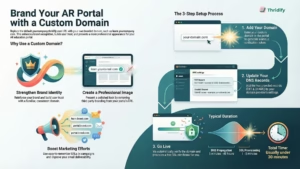
Step 1: Add Your Domain
Enter your chosen domain in the AR Education dashboard.
We instantly generate a unique verification token tied to your account.
Step 2: Verify Domain Ownership via DNS
You’ll add two DNS records with your domain provider:
- TXT Record – Confirms you own the domain
- Name: _thridify-verify.yourdomain
- Value: the verification token we provide
- CNAME Record – Routes traffic to your AR Education portal
- Example: learn → yourcompany.thridify.com
Exact values are provided — it’s a simple copy-paste process.
Step 3: Automatic SSL Provisioning
Once verification completes, we automatically provision an SSL certificate, ensuring your AR Education portal loads securely over HTTPS — no extra setup required.
🎉 Your branded portal is live.
How Long Does Custom Domain Setup Take?
In most cases, teams are live within 30 minutes.
| Step | Typical Time |
| Add domain & receive instructions | Instant |
| DNS propagation | 5–30 minutes (up to 48 hours in rare cases) |
| DNS verification | Instant after propagation |
| SSL provisioning | 1–5 minutes |
Supported Domain Types
You have flexibility when choosing how your branded AR Education portal is structured:
| Domain Type | Example | Supported |
| Subdomain | learn.yourcompany.com | ✅ Yes |
| Nested subdomain | ar.learn.yourcompany.com | ✅ Yes |
| Root domain | yourcompany.com | ✅ Yes* |
| Country-code domain | yourcompany.co.uk | ✅ Yes |
* Root domains may require additional DNS configuration. Subdomains are recommended for faster setup.
Step-by-Step DNS Setup Guides
We provide provider-specific guides to make setup easy:
- GoDaddy
- Namecheap
- Cloudflare
- Google Domains
- General DNS providers
Each guide walks you through exactly what to add and where — no guesswork.
Need Help? We’ve Got You Covered
If you run into any issues:
- Live chat support directly from your dashboard
- Email support at [email protected]
- Detailed troubleshooting guides in our knowledge base on help.thridify.com.
A Simple Way to Think About It
Using a custom domain is like moving from a shared office to your own branded building.
The shared space works — but your own building lets you put your name above the door, create a consistent experience, and clearly signal credibility to every visitor.
If your AR Education portal is central to onboarding, training, or customer education, a custom domain ensures it looks and feels as professional as the experience inside.
Ready to make your AR Education portal unmistakably yours?
Connect your custom domain today and turn every visit into a branded moment.