Introduction — Why Configurators Fail
You’ve invested in a product configurator. You’re offering 3D views, swatches, size options. But conversions aren’t moving — and returns are still climbing. The problem isn’t your product. It’s how your configurator is built. Most brands set it up once and never question it. This guide shows you exactly where it breaks down, and what to do about it.
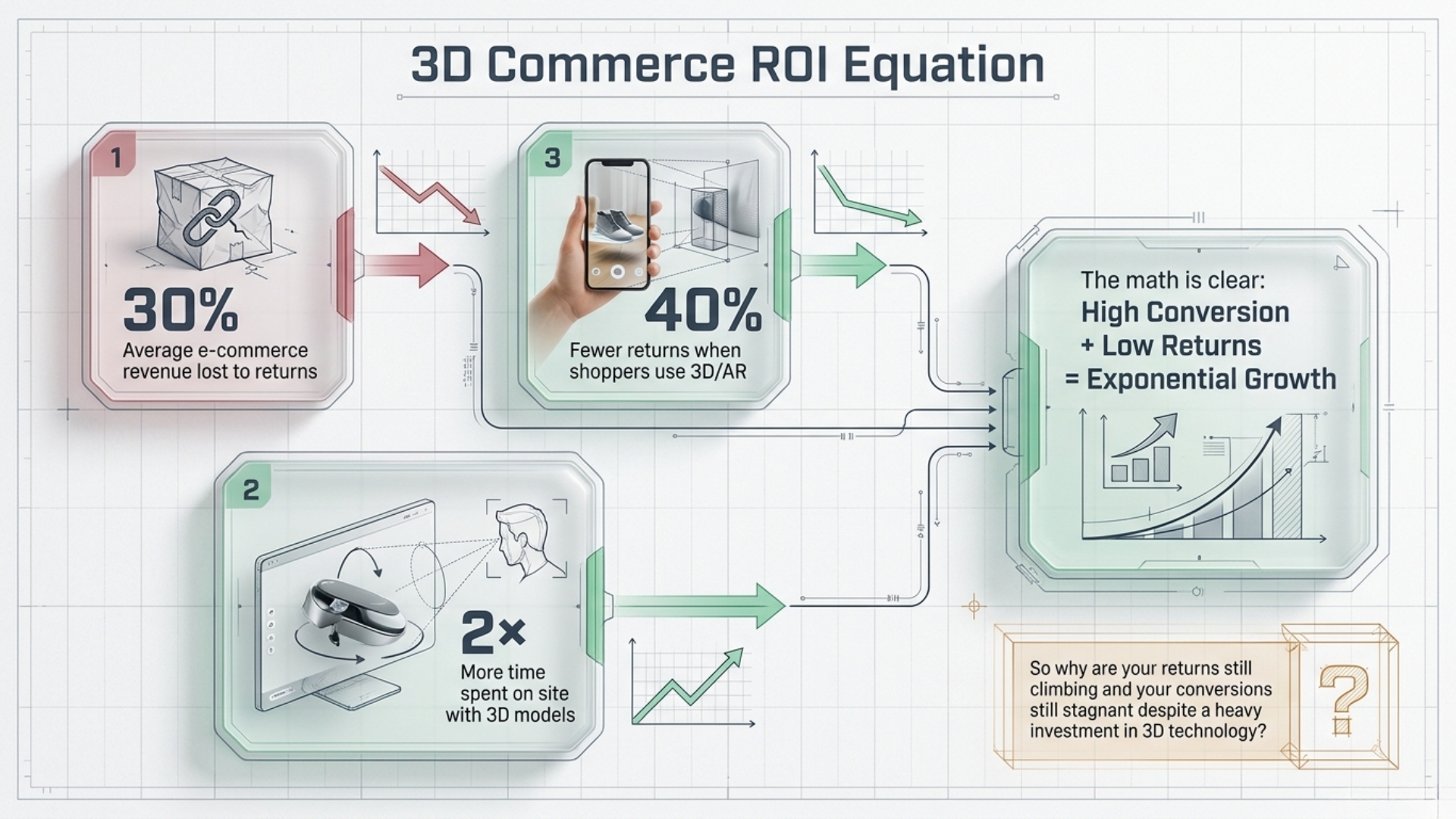
Product configurators are one of the highest-leverage tools in e-commerce — when they work. A buyer who interacts with a 3D configurator is dramatically more likely to convert, and dramatically less likely to return. But the same technology that should be your conversion engine can become your biggest source of drop-off if any one of five critical mistakes is present.
We’ve reviewed hundreds of product pages across furniture, fashion, home decor, and accessories. The same mistakes appear again and again — often in the stores that invested the most in their 3D setup. Here’s what they are, why they kill conversions, and how to fix every one of them.
Mistake 01 — Your 3D Model Takes Too Long to Load
Speed is not a nice-to-have in e-commerce — it is the experience. Research consistently shows that online shoppers make their stay-or-leave decision within the first 3 seconds of a page load. A heavy, unoptimised 3D model file doesn’t just frustrate buyers — it communicates something about your brand before they’ve seen a single product.
The typical unoptimised 3D model used in e-commerce weighs anywhere between 15MB and 80MB. On a standard mobile connection, that translates to 8–40 seconds of load time — a lifetime in buyer attention terms. Most users are already gone before the model renders.
❌ The problem: Unoptimised mesh files, no progressive loading, no CDN delivery. Mobile buyers face 10–40 second load times and leave before seeing your product.
✓ The Thridify fix: Automatic mesh compression and progressive 3D loading. A lightweight proxy loads first, streaming full detail as the user interacts — fast on any connection.
What to check right now:
- ✕ Is your model file larger than 5MB?
- ✕ Are you serving the same file on mobile as desktop?
- ✕ Does your viewer show a blank screen for more than 2 seconds?
- ✓ Use mesh compression or a platform with built-in optimisation
- ✓ Implement progressive loading — show a low-res proxy first
“A one-second delay in page load can reduce conversions by up to 7%. For 3D commerce, where model load is the page, this number is far higher.” — E-Commerce Performance Research, 2024
Mistake 02 — Too Many Options, No Visual Guidance
Choice is good — until it becomes paralysis. The Paradox of Choice is well-documented in consumer psychology: beyond a certain number of options, decision-making doesn’t get easier, it breaks down. Buyers stall, second-guess, and leave without purchasing.
Displaying 40+ swatches without real-time visual feedback, without smart defaults, and without clear hierarchy is the fastest way to turn a motivated buyer into an overwhelmed one.
❌ The problem: Walls of swatches, no visual feedback when selected, no smart defaults. Buyers feel lost and abandon the configurator entirely.
✓ The Thridify fix: Real-time 3D updates on every selection. Buyers see colour, material, and size change instantly — building confidence with every tap.
The best-performing configurators treat visual feedback as a core feature, not an afterthought. When a buyer clicks a swatch and the product visually updates in real-time — in 3D, with accurate material rendering — the selection becomes tangible. They stop second-guessing and start committing.
Mistake 03 — It Works on Desktop. It’s Broken on Mobile.
This is the most damaging and the most common. Brands spend months building a beautiful desktop configurator — and then discover it barely functions on a phone. Given that 70%+ of e-commerce traffic now comes from mobile devices, a desktop-first configurator is not a mobile product with issues — it is a product that doesn’t exist for most of your audience.
3D interactions on mobile require native touch handling: pinch-to-zoom, swipe-to-rotate, tap-to-select. Most legacy configurators were built before mobile was the majority — and it shows. Buttons are too small, the canvas doesn’t respond to gestures intuitively, and AR launch requires redirects to external apps.
❌ The problem: Desktop canvas that pans instead of rotates on touch. Tiny swatches. AR that requires an external app download. Most mobile users bounce before interacting.
✓ The Thridify fix: Mobile-first 3D viewer with native pinch, zoom, and rotate gestures. AR launches directly in browser. Built mobile-first, not adapted from desktop.
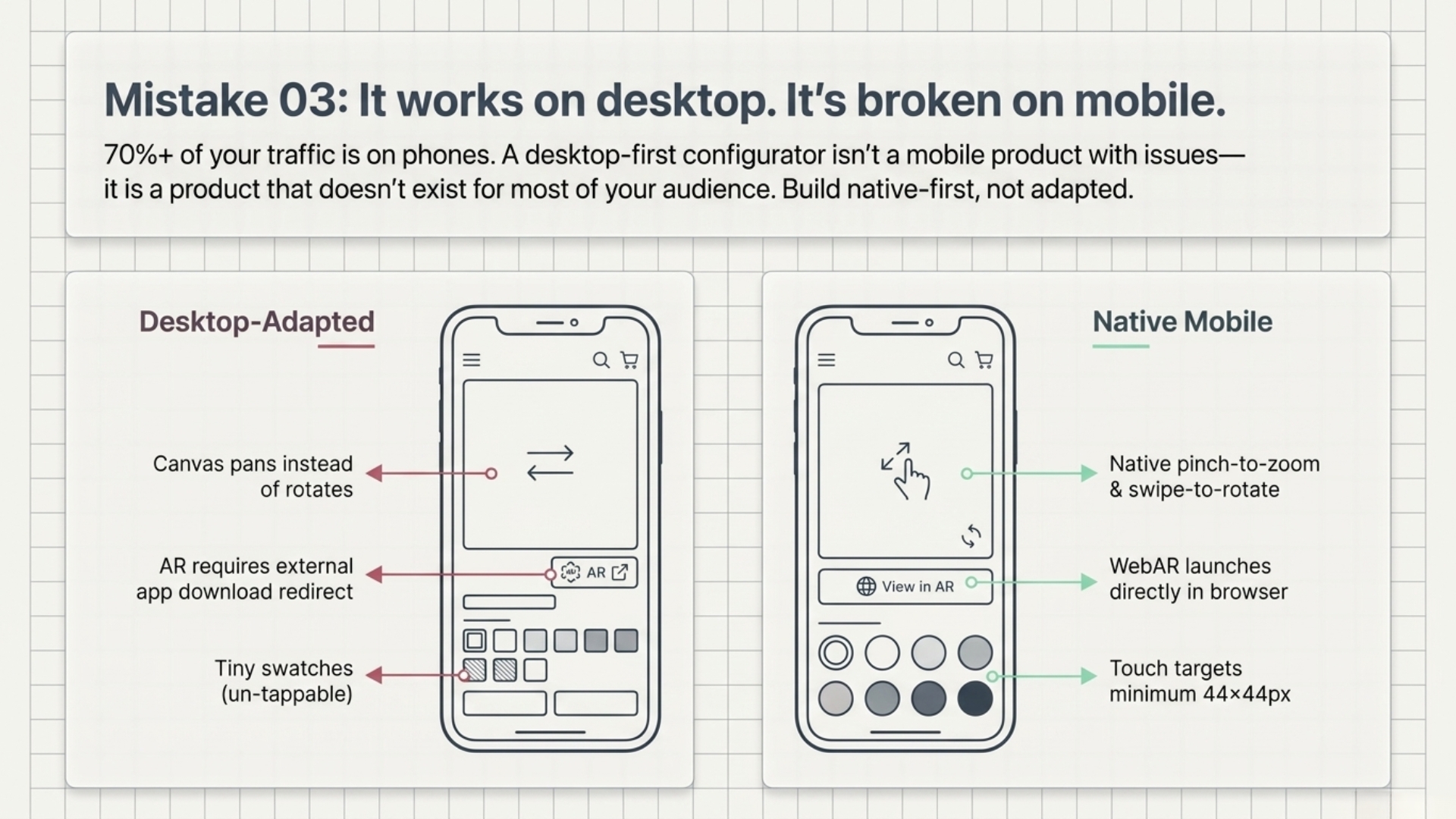
Mobile-first configurator checklist:
- ✓ Pinch-to-zoom and swipe-to-rotate with native feel
- ✓ Touch targets at minimum 44×44px
- ✓ AR launch in browser — no external app required
- ✓ Optimised model file served for mobile bandwidth
- ✕ No separate “mobile version” — one codebase, one experience
Mistake 04 — No AR, So Buyers Still Can’t Visualise It in Their Space
A 3D viewer is a significant step up from flat photography. But it still leaves the most important question unanswered: will this work in my actual space? For furniture, home decor, lighting, and rugs — where scale and proportion are the buying decision — failing to answer this drives the majority of post-purchase returns.
Augmented Reality closes this gap entirely. When a buyer can tap a button and see your product placed in their living room — to scale, in their actual lighting — uncertainty disappears. The purchase becomes confident rather than speculative.
❌ The problem: A 3D spinner doesn’t answer “will this look right in my room?” Without AR, the #1 unsaid objection goes unaddressed — doubt always beats purchase intent.
✓ The Thridify fix: Built-in WebAR lets shoppers place products in their actual space from your product page. Room Fitment Estimation tells buyers if a product fits before they tap AR.
“Shoppers who use AR features are 40% less likely to return a product and convert at a rate 3× higher than those who only view static images.” — AR Commerce Impact Study, 2024
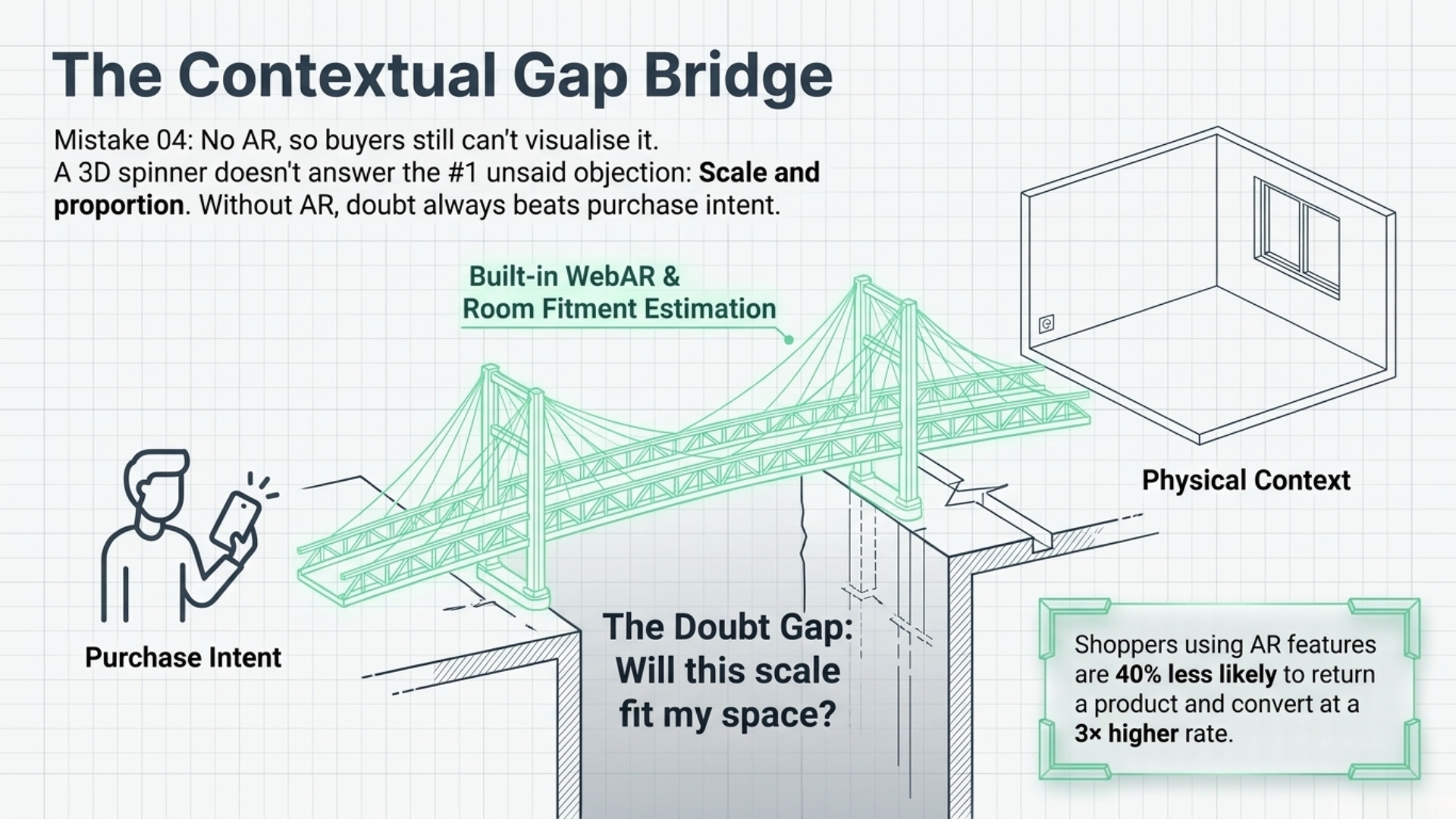
The brands seeing the strongest return reduction aren’t just adding 3D — they’re adding contextual AR that meets buyers in their actual decision-making environment. This is the difference between showing a product and selling confidence in a product.
Mistake 05 — Zero Analytics, So You’re Optimising Blind
The most overlooked mistake is treating your configurator as a set-and-forget feature. A product configurator isn’t just a sales tool — it’s a data machine. Every click, every colour selected, every abandonment point is signal. Without capturing it, you have no way to know what’s working, what’s confusing, and where you’re losing buyers.
Most configurator platforms offer no behavioural analytics. You can see page views and conversions — but not which configuration paths lead to purchase, which combinations generate the most drop-off, or which features are never used. You’re flying completely blind on your highest-intent product experience.
❌ The problem: No visibility into configurator behaviour. You don’t know which options buyers try, where they drop off, or what drives returns.
✓ The Thridify fix: GDPR-first analytics dashboard tracking every interaction, configuration path, and conversion touchpoint. Finally know what your buyers actually do.
With proper configurator analytics, you can run A/B tests on option ordering, identify highest-converting configurations and feature them as defaults, and understand whether your 3D and AR features are actually being used — and by whom. This is the data that compounds over time.
Key Takeaways
01 — Speed is the first impression. Optimise your 3D model files or use a platform that does it automatically.
02 — Real-time visual feedback is the difference between a buyer who commits and one who abandons in confusion.
03 — Build mobile-first. 70%+ of your traffic is on phones — your configurator must be too.
04 — AR removes the final objection. Let buyers place your product in their space before they buy.
05 — Your configurator is a data source. Capture behaviour analytics and use them to continuously optimise.
Quick Audit — How Many Apply to You?
Select every issue your current configurator has:
- ☐ My 3D model takes more than 3 seconds to load on mobile
- ☐ Buyers can’t see changes in real-time when selecting options
- ☐ The configurator is poor or broken on phones
- ☐ We don’t offer AR — buyers can’t see the product in their space
- ☐ We have no analytics on how buyers interact with our configurator
0/5 — You’re ahead of 90% of e-commerce brands. 1–2/5 — One or two issues that are likely costing you more than you think. 3/5 — Already costing you meaningful revenue every month. 4/5 — Your configurator is actively working against you. 5/5 — All five. Very common, very fixable. Book a free Thridify demo.
Ready to Fix It? See Thridify Live on Your Product.
We’ll show you exactly how 3D, AR, and smart configurator analytics look on your actual product — in one free demo.
Book a free demo or email us at contact@thridify.com No commitment · Setup in days · No code required